- GPT 에게 프롬프트 생성 요청

-- weekly_report.tb_project_team_member definition

CREATE TABLE `tb_project_team_member` (
  `id` char(36) NOT NULL DEFAULT uuid(),
  `project_id` char(36) NOT NULL,
  `user_id` char(36) NOT NULL,
  `role` varchar(100) NOT NULL,
  `assigned_date` date DEFAULT curdate(),
  `is_active` tinyint(1) DEFAULT 1,
  `created_at` timestamp NULL DEFAULT current_timestamp(),
  `updated_at` timestamp NULL DEFAULT current_timestamp() ON UPDATE current_timestamp(),
  PRIMARY KEY (`id`),
  UNIQUE KEY `project_id` (`project_id`,`user_id`),
  KEY `user_id` (`user_id`),
  CONSTRAINT `tb_project_team_member_ibfk_1` FOREIGN KEY (`project_id`) REFERENCES `tb_project` (`id`) ON DELETE CASCADE,
  CONSTRAINT `tb_project_team_member_ibfk_2` FOREIGN KEY (`user_id`) REFERENCES `tb_user` (`id`) ON DELETE CASCADE
) ENGINE=InnoDB DEFAULT CHARSET=utf8mb4 COLLATE=utf8mb4_uca1400_ai_ci;

이게 프로젝트 멤버 테이블이고 crud api만들려고해 어떻게 copilot에게 요청할 프롬프트 만들어줘
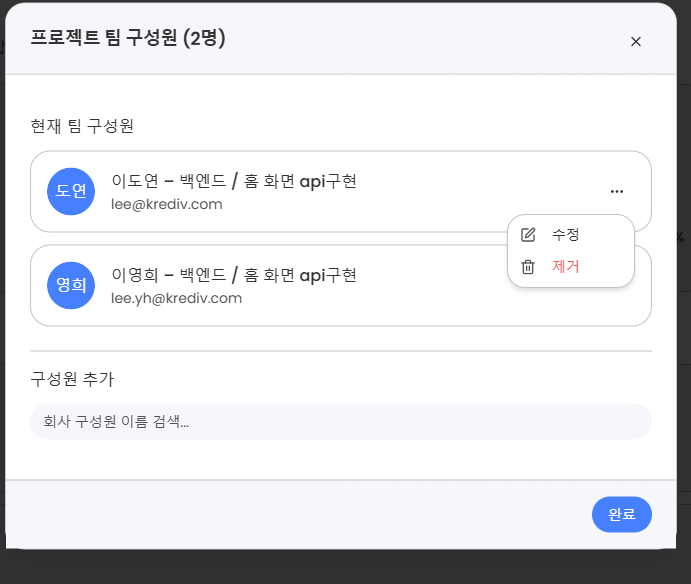
첨부한 사진처럼 되어있는곳에 api를 추가할거야
프롬프트 생성, copilot에게 입력
Spring Boot + MyBatis 기반으로 프로젝트 팀 구성원(tb_project_team_member) CRUD API를 구현해줘.

---

📌 테이블 구조
CREATE TABLE tb_project_team_member (
  id char(36) PRIMARY KEY DEFAULT uuid(),
  project_id char(36) NOT NULL,
  user_id char(36) NOT NULL,
  role varchar(100) NOT NULL,
  assigned_date date DEFAULT curdate(),
  is_active tinyint(1) DEFAULT 1,
  created_at timestamp DEFAULT current_timestamp,
  updated_at timestamp DEFAULT current_timestamp ON UPDATE current_timestamp,
  UNIQUE KEY (project_id, user_id),
  FOREIGN KEY (project_id) REFERENCES tb_project(id) ON DELETE CASCADE,
  FOREIGN KEY (user_id) REFERENCES tb_user(id) ON DELETE CASCADE
);

---

📌 구현 목표

1. **팀 구성원 목록 조회**
   - `GET /api/projects/{projectId}/members`
   - tb_project_team_member + tb_user 조인
   - 응답 데이터 예시:
     ```json
     [
       {
         "userId": "uuid",
         "name": "이도연",
         "email": "lee@krediv.com",
         "department": "백엔드",
         "role": "홈 화면 API구현",
         "avatarUrl": "...",
         "assignedDate": "2025-10-27"
       }
     ]
     ```
   - is_active = 1 인 사용자만 조회

2. **팀 구성원 추가**
   - `POST /api/projects/{projectId}/members`
   - 요청 바디: `{ "userId": "...", "role": "..." }`
   - 같은 user_id 가 이미 존재하면 409 반환
   - 성공 시 201 반환

3. **팀 구성원 수정**
   - `PATCH /api/projects/{projectId}/members/{userId}`
   - 요청 바디: `{ "role": "..." }`
   - 역할(role) 또는 활성 상태(is_active) 변경 가능

4. **팀 구성원 제거**
   - `DELETE /api/projects/{projectId}/members/{userId}`
   - 실제 삭제 대신 is_active = 0 업데이트

---

📌 구현 방식
- Controller: `ProjectTeamMemberController`
- Service: `ProjectTeamMemberService`
- Mapper 인터페이스: `ProjectTeamMemberMapper`
- Mapper XML: `ProjectTeamMemberMapper.xml`
- DTO: `ProjectTeamMemberRequest`, `ProjectTeamMemberResponse`
- 응답 래핑: `ApiResponse<T>` 형태 사용
- 예외 처리: 중복 추가, 존재하지 않는 사용자, FK 제약 위반 시 적절한 메시지 반환

---

📌 추가 설명
이 API는 프로젝트 상세 페이지의 “참여 인원 카드”에서 사용됨.
- ‘추가’ 버튼 → POST
- ‘수정’ 버튼 → PATCH
- ‘삭제’ 버튼 → DELETE
- 페이지 진입 시 → GET 호출

UI 예시는 첨부된 이미지 참고.
- copilot 결과
I implemented the requested Project Team Member CRUD API (no DTOs — controller uses Map<String,Object> / path params) and wired MyBatis mapper + XML. Files I added/updated and what they do:

Files created
- src/main/java/egovframework/ai/managing/controller/project/ProjectTeamMemberController.java
  - REST endpoints:
    - GET /api/projects/{projectId}/members
    - POST /api/projects/{projectId}/members
    - PATCH /api/projects/{projectId}/members/{userId}
    - DELETE /api/projects/{projectId}/members/{userId}
  - Uses ApiResponse<T> wrapper.

- src/main/java/egovframework/ai/managing/service/project/ProjectTeamMemberService.java
  - Service interface.

- src/main/java/egovframework/ai/managing/service/project/ProjectTeamMemberServiceImpl.java
  - Business logic: validation, duplicate detection, add / update / deactivate operations using mapper, transactional behavior.
  - addMember checks for existing active membership and throws DuplicateKeyException if already present.

- src/main/java/egovframework/ai/managing/mapper/project/ProjectTeamMemberMapper.java
  - MyBatis mapper interface (annotated @Mapper) with:
    - selectMembersByProjectId, selectMember, countMember, insertMember, updateMember, deactivateMember.

- src/main/resources/mapper/ProjectTeamMemberMapper.xml
  - SQL mappings for the mapper methods. Joins tb_user for listing members and supports insert/update/deactivate.

Files modified
- src/main/java/egovframework/ai/managing/common/GlobalExceptionHandler.java
  - Added handlers for DuplicateKeyException (409) and DataIntegrityViolationException (400) to return meaningful ApiResponse.fail messages.

Behavior / validation / error responses
- List members (GET)
  - Returns ApiResponse.success("ok", List<Map<String,Object>>) with only active members (is_active = 1).
  - Each item contains: userId, name, email, department, role, avatarUrl, assignedDate.

- Add member (POST)
  - Request body (JSON): { "userId": "...", "role": "..." , optional "assignedDate":"yyyy-MM-dd" }
  - Validates projectId and userId presence.
  - If the same user is already an active member -> 409 CONFLICT (DuplicateKeyException) with message.
  - If FK or DB integrity issues (e.g. userId or projectId not exist) -> 400 BAD REQUEST with details (DataIntegrityViolationException).
  - On success -> 201 CREATED with ApiResponse.success("Member added", null).

- Update member (PATCH)
  - Request body can include any of: role, isActive, assignedDate (no DTO — Map used).
  - If member not found -> 404 NOT FOUND (NoSuchElementException).
  - On success -> 200 OK with ApiResponse.success("Member updated", null).

- Remove member (DELETE)
  - Soft delete: sets is_active = 0.
  - If member not found -> 404 NOT FOUND.
  - On success -> 200 OK with ApiResponse.success("Member removed", null).

Notes / implementation choices
- No DTOs used: controller methods accept Map<String, Object> or path parameters as requested.
- MyBatis xml namespace = egovframework.ai.managing.mapper.project.ProjectTeamMemberMapper and placed under src/main/resources/mapper (same location as existing mappers).
- Mapper interface annotated with @Mapper so MyBatis/Spring should pick it up (consistent with other mappers).
- I added selectMember in the mapper/XML for potential reuse (e.g. re-activate earlier inactive rows) though current addMember only checks active existence — if you want to automatically reactivate an inactive record instead of inserting, I can adjust the service logic to update is_active=1 when selectMember shows an inactive row.
- Exceptions are handled by the global exception handler added/updated earlier; errors are returned as ApiResponse.fail with appropriate HTTP status codes.

Example request/response outlines
- GET /api/projects/abcd-1234/members
  - 200 OK
  - body: ApiResponse.success("ok", [ { "userId":"...", "name":"...", "email":"...", "department":"...", "role":"...", "avatarUrl":"...", "assignedDate":"2025-10-27" } ])

- POST /api/projects/abcd-1234/members  (body: { "userId":"u-1", "role":"Developer" })
  - 201 Created -> ApiResponse.success("Member added", null)
  - 409 Conflict -> ApiResponse.fail("User is already a member of the project")

- PATCH /api/projects/abcd-1234/members/u-1  (body: { "role":"Lead" })
  - 200 OK -> ApiResponse.success("Member updated", null)
  - 404 Not Found -> ApiResponse.fail("Member not found")

- DELETE /api/projects/abcd-1234/members/u-1
  - 200 OK -> ApiResponse.success("Member removed", null)
  - 404 Not Found -> ApiResponse.fail("Member not found")

If you want:
- I can change addMember to reactivate an existing inactive row instead of inserting a duplicate.
- Add unit/integration tests for controller/service.
- Provide sample curl/postman examples or add OpenAPI annotations.

Next step? (pick one)
- I’ll implement automatic reactivation on add if you prefer.
- Or I’ll add tests and example requests.
📘 프로젝트 팀 구성원 API 명세서
| 구성원 목록 조회 | GET | /api/projects/{projectId}/members | Path: projectId | 200 OK | 활성(is_active=1) 구성원 목록 조회. tb_user 조인하여 이름, 이메일, 부서, 역할, 프로필 등 반환 |
| 구성원 추가 | POST | /api/projects/{projectId}/members | Body:{ "userId": "...", "role": "...", "assignedDate": "YYYY-MM-DD" } | 201 Created409 Conflict400 Bad Request | 구성원 추가. 이미 존재 시 409 반환, FK 오류 시 400 반환 |
| 구성원 수정 | PATCH | /api/projects/{projectId}/members/{userId} | Body:{ "role": "...", "isActive": 0 or 1, "assignedDate": "YYYY-MM-DD" } | 200 OK404 Not Found | 역할, 참여일자, 활성 여부 수정. 존재하지 않으면 404 |
| 구성원 삭제 (비활성화) | DELETE | /api/projects/{projectId}/members/{userId} | Path: projectId, userId | 200 OK404 Not Found | 실제 삭제 대신 is_active = 0 으로 처리 (소프트 삭제) |
이제 이 api를 가지고 프론트에 연결할거야 cursor에게 요청할 프롬프트 만들어줘 프로젝트 목록 > 프로젝트 상세보기 > 참여인원 (수정 버튼 ) > 프로젝트 팀 구성원 다이얼로그 추가 버튼 - 생성 api 연결 추가된 멤버 수정 버튼 - 수정 api 연결 제거 버튼 - 제거 api 연결 카드 멤버 - 조회 api 연결

프로젝트 상세 페이지의 "참여 인원(Team Members)" 섹션에 다음 API를 연동해줘.

백엔드 API 엔드포인트 (이미 구현 완료):
- GET    /api/projects/{projectId}/members
- POST   /api/projects/{projectId}/members
- PATCH  /api/projects/{projectId}/members/{userId}
- DELETE /api/projects/{projectId}/members/{userId}

요구사항:

1️⃣ **멤버 목록 조회 (카드 렌더링용)**
- 프로젝트 상세 페이지 진입 시 자동 호출.
- Axios GET 요청 → 응답 data를 상태로 관리 (예: `members`, `setMembers`).
- 각 카드에는 이름, 역할, 부서, 이메일, 아바타, 참여일자 표시.
- API 응답: ApiResponse.success("ok", [ {userId, name, role, ...} ])

2️⃣ **추가 버튼 (다이얼로그 내에서 호출)**
- 다이얼로그에서 userId, role, assignedDate 입력 후 "추가" 버튼 클릭 시 POST 요청.
- 요청 바디: `{ userId, role, assignedDate }`
- 성공 시 다이얼로그 닫고, 목록 새로고침 (GET 다시 호출).
- 실패 시 alert로 에러 메시지 출력 (409 또는 400 처리).

3️⃣ **수정 버튼 (다이얼로그 내 기존 멤버 수정)**
- 수정 대상 멤버 선택 후 PATCH 요청.
- 요청 URL: `/api/projects/{projectId}/members/{userId}`
- 요청 바디: `{ role, isActive, assignedDate }`
- 성공 시 목록 갱신.

4️⃣ **제거 버튼 (비활성 처리)**
- 목록의 각 멤버 카드에서 “제거” 클릭 시 DELETE 요청.
- 성공 시 목록 갱신 (GET 다시 호출).
- 삭제 전 confirm 창 표시 (“이 멤버를 제거하시겠습니까?”).

5️⃣ **UI 연동**
- 상위 페이지: `ProjectDetailPage.tsx`
- 참여인원 카드 컴포넌트: `ProjectMembersCard.tsx`
- 추가/수정 다이얼로그: `ProjectMemberDialog.tsx`
- API 호출 로직: `projectMemberService.ts` 파일로 분리해서 axios 함수 정리
  ```ts
  export const projectMemberService = {
    list: (projectId) => apiClient.get(`/api/projects/${projectId}/members`),
    add: (projectId, data) => apiClient.post(`/api/projects/${projectId}/members`, data),
    update: (projectId, userId, data) => apiClient.patch(`/api/projects/${projectId}/members/${userId}`, data),
    remove: (projectId, userId) => apiClient.delete(`/api/projects/${projectId}/members/${userId}`)
  }
'work' 카테고리의 다른 글
| 사내 프로젝트 툴 제작기 : AI 다써보기 (0) | 2025.11.27 |
|---|---|
| 기능 추가 - 날짜 필터링 (0) | 2025.10.29 |
| 프론트 페이지 리팩토링 (0) | 2025.10.27 |
| Copilot으로 만드는 댓글 관리 API (0) | 2025.10.20 |
| 백엔드(copilot) 을 사용한 후 프론트엔드 (cusor) 로 연결 (0) | 2025.10.20 |
